This group got further along than any induction so far. I was really happy and thank every one who came out. I have a couple of things here as a follow up that might be helpfull and if you leave comments or email me I can follow up here as well.
First here is a map of the dorkboard pins using the arduino pin numbering system.
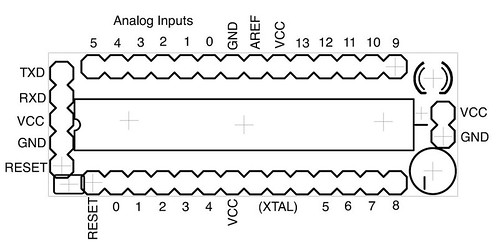
Also here is the .inf file which makes the Benito use the built in windows drivers.
;  Windows MyUSB USB to Serial Setup File

; Copyright (c) 2000 Microsoft Corporation
[Version]
Signature="$Windows NT$"
Class=Ports
ClassGuid={4D36E978-E325-11CE-BFC1-08002BE10318}
Provider=%COMPANY%
LayoutFile=layout.inf
DriverVer=06/06/2006,1.0.0.0
[Manufacturer]
%MFGNAME% = ManufName
[DestinationDirs]
DefaultDestDir=12
[ManufName]
%Modem3% = Modem3, USBVID_03EB&PID_204B
;------------------------------------------------------------------------------
; Windows 2000/XP Sections
;------------------------------------------------------------------------------
[Modem3.nt]
CopyFiles=USBModemCopyFileSection
AddReg=Modem3.nt.AddReg
[USBModemCopyFileSection]
usbser.sys,,,0x20
[Modem3.nt.AddReg]
HKR,,DevLoader,,*ntkern
HKR,,NTMPDriver,,usbser.sys
HKR,,EnumPropPages32,,"MsPorts.dll,SerialPortPropPageProvider"
[Modem3.nt.Services]
AddService=usbser, 0x00000002, DriverService
[DriverService]
DisplayName=%SERVICE%
ServiceType=1
StartType=3
ErrorControl=1
ServiceBinary=%12%usbser.sys
;------------------------------------------------------------------------------
; String Definitions
;------------------------------------------------------------------------------
[Strings]
COMPANY="Tempus Dictum, Inc"
MFGNAME="Donald Delmar Davis"
Modem3="USB Virtual Serial Port"
SERVICE="USB Virtual Serial Port CDC Driver"
sindicate
Just for clarity, is the a top or bottom view of the Board? It looks like the top to me. But then again, i built my first one wrong so I’m not the one to listen to. I almost asked to see polarity, but its already there, just a little faint. Thanks for all of your hard work! It really is appreciated!
feurig
Thanks for pointing this out. It didnt occur to me that since everything is vertically symetrical there is some ambiguity. I need to lable some of the photos so that the Dorkboard logo is on the bottom and the parts are on the top.
DarkStar
I thought the workshop was great and I definitely look forward to a future ones. I ended up swapping out the female header for the serial port with a male one, and then installed a female connector on the end of the cable of the Benito and finished it off with shrink wrap.
The second dorkboard I bought I built for my breadboard and works great too. To power the dorkboards in a stand-alone fashion, I went to RadioShack and bought a 4-AA battery holder. It’s a pretty nice case with an On-Off switch and a good length power lead. I soldered a female header to the battery pack and used shrink wrap to make it look really nice.
I’ll get some high-res pictures posted soon showing my setup…
–Chris ^_^
sindicate
The more I play with the new dorkboards the more I like them. The placement of the standalone power input is actually one of my favorite parts. The small size is great, the pin placement is quite nice as well. Good work all around.
lossowski
The workshop was great. I like the board. The Arduino programming environment and examples make the AVR very easy. After the workshop, since I had to leave early, I was able to get the board working in Windows. I’m still having some issues with Linux related to the USB Serial being recognized by Arduino-011.
Linux is recognizing the Benito and registering /dev/ttyACM0 correctly but the Arduino software will not recognize it as a serial port under Tools. I’ll keep working at it. I’ll let you know what I find out.
feurig
Try that and let me know if that works.
See you saturday.
tlockney
You know, probably the best way to do this is to add an udev rule. I’ll figure out the correct one with this benito of feurig’s I have and post it when I get a chance later.
lossowski
I don’t know why I didn’t think of this at the Cult Induction. It worked like a charm. Now I can work on a way to make it automatic. Thanks.
tlockney
So, I finally sat down tonight and (using Feurig’s benito ;~) figured out the udev rule for this.
Basically, create a file under /etc/udev/rules.d (at least, for Ubuntu/Debian, not sure about other distros) called 80-dorkboard.rules and place this content in there:
ATTR{idProduct}==”204b”,ATTR{idVendor}==”03eb”,SYMLINK+=”ttyS0″
You can change the content of the SYMLINK bit to suit your needs. For some reason my Arduino IDE won’t seem to accept anything but ttyS0 as the serial port name. For the case Feurig described earlier, you can use ttyUSB0 or whatever. You might need to experiment.
Anyway, after that is done, run ‘sudo /etc/init.d/udev restart’ (or just run it as root directly — whatever floats your boat) and reattach the benito.
dankreek
I did a similar thing, but the rule I used was:
KERNEL==”ttyACM*”, ATTRS{product}==”Benito*”, SYMLINK+=”ttyUSB%n”
The ttyS0 device already existed on my Ubuntu 8.10 system and the above rule would not work, also this is a more general rule and will work in cases where someone is using more than one Benito on the same system (though probably not a common situation). And I wasn’t sure if future versions of the Benito will contain the same product ID, so I just used the product name string.
However, if someone is using a USB serial device in conjunction with a Benito, things could get a little hosey.
—-
“Push my button, my heart starts pumping, and electricity will keep the good times coming.” – Bruce Haack
earfeast
I’m using Gentoo 2008.0, but this should be applicable to any Linux distribution that uses udev (most distributions I’ve seen lately):
SUBSYSTEMS==”usb”, ATTRS{product}==”LUFA CDC Demo”, KERNEL==”ttyACM*”, SYMLINK+=”ttyPanel”, GROUP=”maketv”, MODE=”0660″
I’m using the LUFA CDC demo on my Teensy++ — change the product name to whatever’s in your USB device’s descriptor. I’ve narrowed the product name matching to only USB devices. ACM is the CDC_ACM driver that must be built into your kernel or loaded as a module (which udev will do for you automatically). If you don’t want to run your scripts or IDE as root, you can ask udev to create a symbolic link (SYMLINK) that points to the actual device, and tell it the USER and/or GROUP you want udev to give the device. SYMLINK is also helpful if you want a particular device to always come up with a certain device name.
In my example, I want my USB device to be recognized by its name “LUFA CDC Demo”. I want all users in group “maketv” to have access to the device. And I want a symbolic link called “ttyPanel” that will always point to the device that matches this rule.